Troubleshooting Dashboard Warning Lights Including After Installing Tolerance Stack Seat Mounts and scheel-mann Seats

Installing aftermarket seat mounts can sometimes trigger dashboard warning lights, which understandably leaves drivers puzzled and concerned. Modern Toyota vehicles rely on multiple safety sensors integrated into the seat structure, and disturbing those connections during a seat swap can occasionally trigger warning indicators.
Fortunately, most issues are straightforward to diagnose.
Tolerance Stack invested significant engineering effort to minimize these issues when installing scheel-mann seats into Toyota Tacoma, FJ Cruiser, and 4Runner vehicles. However, every vehicle platform is slightly different, and installation variables can still occasionally trigger safety system alerts.
If you've recently installed Tolerance Stack seat mounts and are now seeing warning lights on your dash, don't panic. Most problems can be resolved through systematic troubleshooting using the flowchart provided above.

Start With the Most Important Question
Before diving into diagnostics, ask yourself one simple question:
Did the issue exist before installing or removing the seats?
If warning lights were already present before the seat installation, the issue likely isn't related to the seat swap.
In that case:
Refer to your Factory Service Manual
Scan for Diagnostic Trouble Codes (DTCs) using an OBD-II scan tool
Inspect vehicle wiring if it may have been damaged during installation
Following standard diagnostic procedures will help identify the underlying issue.
However, if the warning lights appeared only after the seat installation, continue troubleshooting using the steps below.
Understanding Your Dashboard Warning Lights

Modern Toyota vehicles use several dashboard indicators related to safety systems. The most common lights you may encounter after a seat installation include:
Check Engine Light (MIL)- A yellow or amber engine icon that typically indicates engine or emissions faults. This light is generally unrelated to seat installation unless wiring was accidentally damaged.
Airbag Warning Light- A red SRS warning indicator that signals a fault in the Supplemental Restraint System.
Seatbelt Warning Light- A red seatbelt indicator showing that a buckle circuit may be open or not functioning correctly.
Passenger Airbag Status Lights- Indicators showing AIRBAG ON or PASSENGER AIRBAG OFF, which reflect how the Occupant Classification System (OCS) has classified the passenger seat.
These lights provide important clues about where to begin troubleshooting.
Airbag System Checks
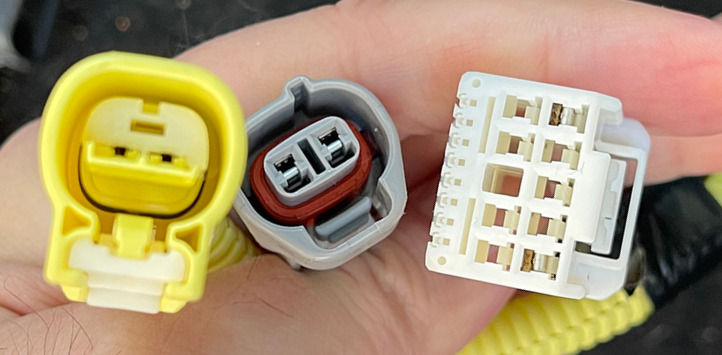
If the airbag warning light is illuminated, start by verifying that the airbag proxy resistor is installed and properly seated in the SRS connector under the seat.

During many seat upgrades, the factory side airbag located in the original seat must be electrically simulated using an airbag proxy. If this proxy is missing, incorrectly installed, or has the wrong resistance value, the SRS system will trigger a fault.
Check the following:
Confirm the airbag proxy is installed
Verify the proxy connector is fully seated and locked
Confirm the resistor value matches Toyota SRS specifications (typically around ~2.2Ω at room temperature)
Improperly functioning airbag circuits are safety critical. If you are unsure about the configuration, consult a qualified technician.
Driver Seat Sensor and Seatbelt Checks

Toyota seats also incorporate a driver seat position sensor, typically mounted under the seat on the seat track rail. This sensor informs the airbag system about the seat's position relative to the steering wheel.
During seat installation this connector can sometimes become disconnected. If you see seatbelt or airbag related warnings:
Verify the driver seat position sensor is connected
Check the driver seatbelt buckle connector
Confirm the seatbelt is functioning normally
Some vehicles may store position-related fault codes such as B1651 or B1183, which indicate issues with the driver seat position sensor. If needed, the sensor circuit can be tested by checking for:
Approximately 5V reference voltage
Resistance typically between 1kΩ and 10kΩ depending on seat position
Signs of corrosion or connector damage
Passenger Seat Occupant Detection System (OCS)
The passenger seat uses an Occupant Classification System (OCS) to determine whether the passenger airbag should deploy.

This system relies on a load-cell sensor array mounted under the passenger seat.
These sensors measure seat weight and determine whether the occupant is:
Empty seat
Child / light object
Adult passenger
During seat installation the load-cell connectors can sometimes become loose or misaligned.
Check the following:
Verify the OCS harness is fully connected
Ensure all load-cell connectors are fully seated and clicked into place
Confirm connectors were not swapped between sensors
If a connector was unplugged during installation, the system may store a fault code that will not clear simply by cycling the ignition. In those cases the codes must be cleared using a scan tool.
Passenger Airbag Status Behavior
The passenger airbag status indicator helps confirm whether the OCS system is functioning correctly.
If AIRBAG ON is displayed while an adult passenger is seated, this is normal. The system has classified the seat as occupied and enabled the passenger airbag.
However, if AIRBAG ON appears with no passenger present, the system may be misclassifying weight on the seat. In that situation:
Remove any objects from the seat
Verify OCS connectors are secure
Check that the seat is installed correctly
If the system continues misclassifying the seat, a recalibration may be required.
OCS Calibration and Zero-Point Reset
In some cases the OCS system may require recalibration after a seat has been removed or replaced.
This is known as a zero-point calibration.
Calibration is performed using Toyota's diagnostic software TechStream, under:
Utility → Occupant Detection System → Zero Point Calibration
For calibration to succeed:
The seat must be completely empty
The vehicle must be on level ground
No SRS fault codes can be stored in memory
A stable 12V power supply must be present
If you do not have access to TechStream, a mechanic shop familiar with Toyota vehicles can perform this procedure quickly.
When Professional Help is Needed
If you've verified connectors, sensors, and installation steps but warning lights remain illuminated, professional diagnostic equipment may be required.
A Toyota-experienced mechanic can help with:
Clearing stored SRS codes
Performing OCS zero-point calibration
Diagnosing airbag system faults
Inspecting seat sensor circuits
Critical Safety Considerations
Airbag systems are safety-critical components.
Improperly functioning airbag systems can lead to serious injury or death in a collision. If you are unsure about any aspect of the system, consult a qualified technician.
Never ignore persistent airbag warnings. When faults are detected, the system may disable airbag deployment entirely, meaning safety systems may not function during an accident.
Final Thoughts
Seeing warning lights after installing new seat mounts can be alarming, but most issues are caused by simple connector or sensor problems that can be resolved with careful inspection.
Start with the basics:
Verify connectors
Confirm sensors are plugged in
Check for stored codes
Perform calibration if needed
The goal isn't simply to turn off the warning lights. The goal is to ensure that every safety system in your vehicle is functioning exactly as intended.
#ToleranceStack #SeatMounts #AftermarketSeats #CarMods #VehicleModification #DIYInstall #SeatInstallation #DashboardLights #WarningLights #AirbagTroubleshooting #CarTroubleshooting #OBD2 #DiagnosticCodes #CarElectronics #AirbagSafety #SeatbeltSafety #OccupancySensor #CarSafety #VehicleSafety #SafetyFirst #ToyotaMods #TechStream #ToyotaTroubleshooting #ToyotaTech #AutomotiveRepair #CarTech #VehicleMaintenance #CarDIY #AutomotiveTips #CarCommunity #Automotive #CarEnthusiast #FixIt #CarProblems #TroubleshootingTips #CarHelp #VehicleIssues


Comments